
ELEVE ADMIN · WINDOWS PRIVILEGE CONTROL

Administrator access.
Only when
it is needed.

Temporary local administrator rights and application installation requests for Windows devices. Grant time-limited access, review requests and check activity history in one console.

BUILT FOR IT TEAMS AND WINDOWS ENVIRONMENTS
EEleve Admin / control center
Illustrative view
Activity overview
ADMIN SESSIONFrom request to automatic expiry.Access expires when the session ends.
Active
REQUEST MANAGEMENT
Application installationUser request · EXE / MSI
To review
Administrator decisionRequest and execution history
Decisions and events in one place.
A clear activity trail

ELEVE ADMIN / CAPABILITIES

Keep essential IT tasks in view.

Eleve Admin is a product of the JiT Admin project. It brings together access decisions, installation requests and information about Windows devices.

01 / SESSIONS

Temporary admin rights

Grant access for a defined period and review session history.

02 / REQUESTS

Application installations

Review installation requests and follow the execution result.

03 / LOCKDOWN

Remote device lock

Restrict access to a selected computer and check the command status.

Explore all features

VIDEO / TEMPORARY ADMINISTRATOR RIGHTS

See a temporary admin request in action.

This short video walks through an employee request, an administrator decision and time-limited access. Watch the flow, then explore the full workflow.

Explore the full workflow

Video in English · YouTube ↗

TENANT CONSOLE / OPERATIONS CENTER

The signals that matter, in one view.

The summary screen brings device health and administrative activity together. See online and offline devices, requests awaiting a decision and active administrator sessions.

  1. 01

    Device health

    Device status and recent agent heartbeats.

  2. 02

    Current work

    Requests and sessions that need IT attention.

  3. 03

    Quick access

    Inventory, Requests and Audit from the summary.
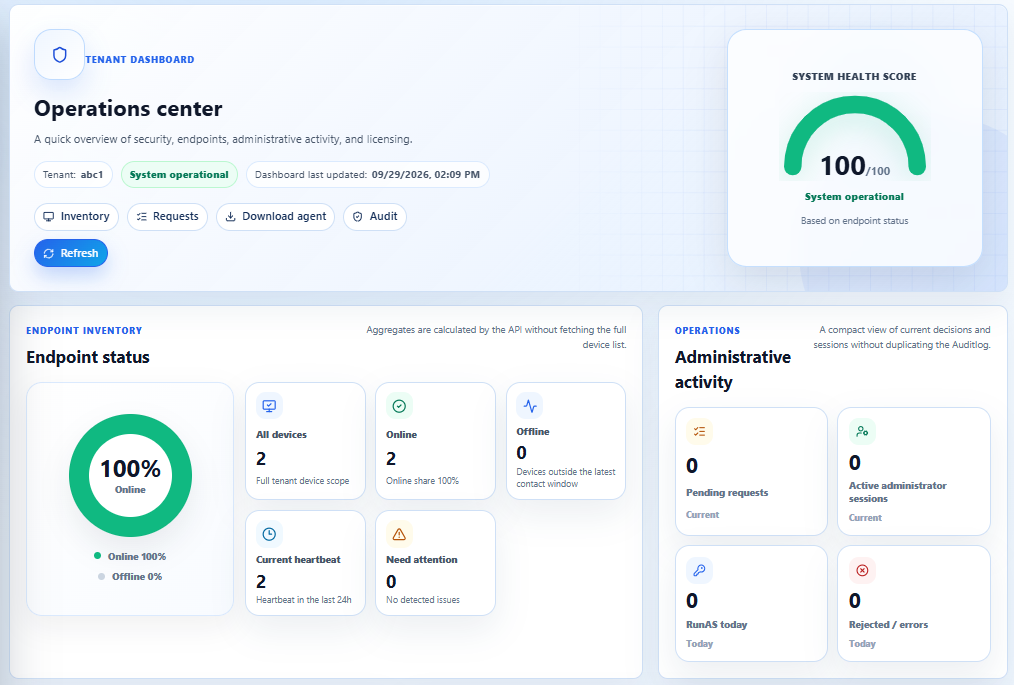
Eleve Admin Operations center showing device health and administrative activity in a sample view.
Operations center · view based on the tenant consoleOpen full-size view ↗

HOW IT WORKS

An employee makes a request. IT decides. The system keeps the history.

See how it works
Request demo access

ELEVE ADMIN / FAQ

See Eleve Admin in action

How are rights granted, what does the audit log show, and how do you manage Windows workstations? Find practical answers in one place.

Explore the questions