
PRODUCT FEATURES

Access and device control. One console.

Explore temporary Windows admin rights, application installation requests, remote computer lock and device inventory for IT teams.

ELEVE ADMIN / TENANT FEATURES

Privileges, devices and decisions. In one place.

Ten areas of work in the tenant console. Each function includes a practical use case and the actions available to an administrator.

01 / SESSIONS

Temporary administrator rights

Grant local administrator privileges for a defined period and review the session history.

When it helpsAn employee needs administrator rights for a limited time, without permanent membership in the local Administrators group.

View details
What the administrator does

An administrator receives the request, approves it for a defined period or rejects it with a comment, and can later review the session history.
Learn more See the full workflow
02 / REQUESTS

Installing applications that require administrator rights

Approve or reject users’ requests to install applications. After approval, track the installation progress and outcome.

When it helpsAn employee wants to install an application that requires administrator rights.

View details
What the administrator does

An administrator reviews the request, approves or rejects it, and after approval checks the installation progress and outcome.

Learn more
03 / LOCKDOWN

Remote computer lock

Lock a selected Windows device from the tenant console when needed and check the action status.

When it helpsA selected device needs immediate access restriction.

View details
What the administrator does

An administrator issues a remote lock command and checks its status in the console.

Learn more

MORE FEATURES

04 / DEVICES

Device inventory

View registered Windows devices and information collected by the agent on each device.

When it helpsYou need to find a computer quickly and check whether its agent is active.

View details
What the administrator does

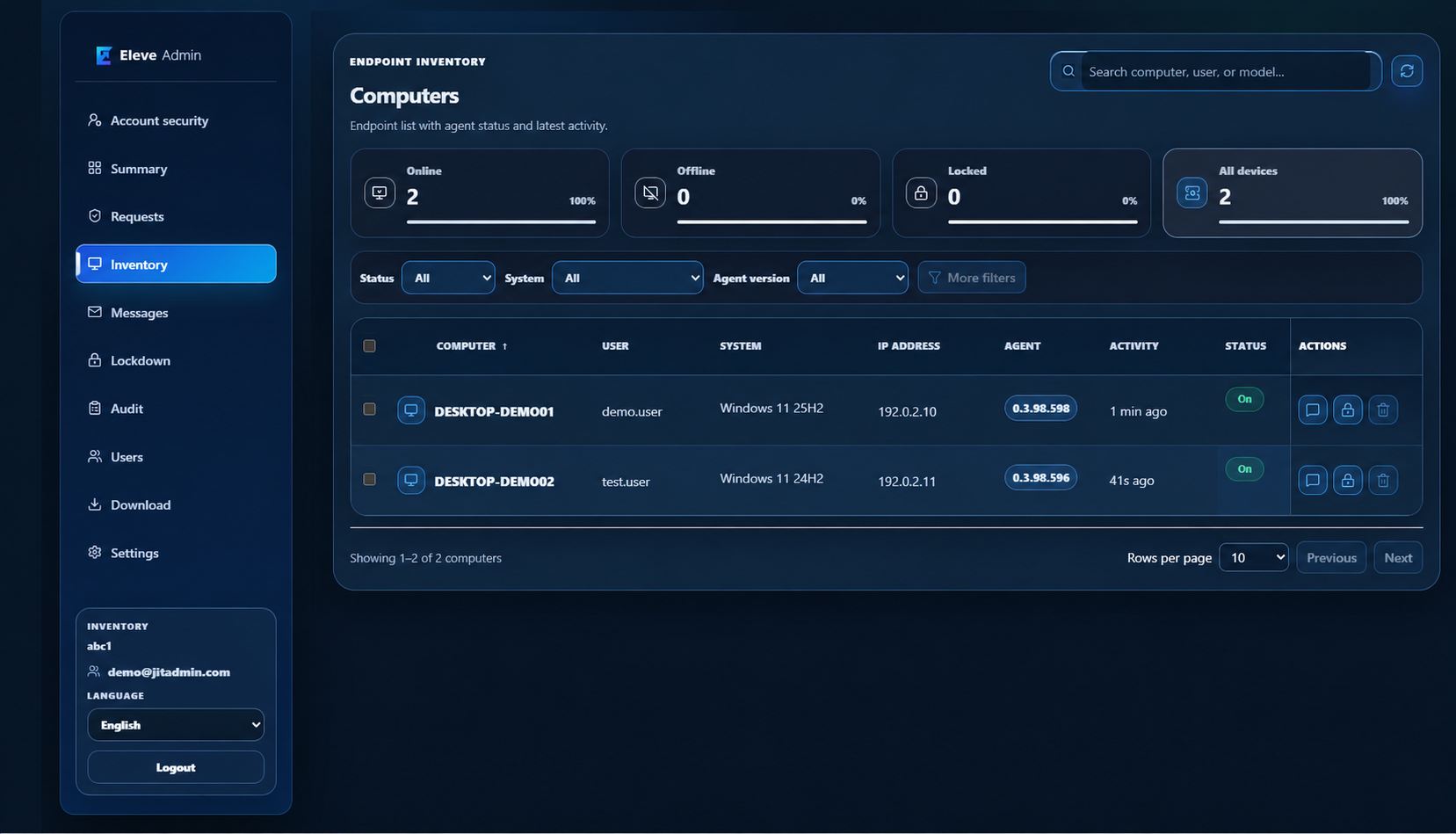
Inventory shows device status, operating system, agent version and recent activity, with search and filters.

Learn more
05 / HISTORY

Audit trail

Review requests, decisions, sessions and other events associated with users and devices.

When it helpsYou need to reconstruct a request, decision or session.

View details
What the administrator does

The audit trail helps trace events associated with a user and device.

Learn more
06 / COMMUNICATION

Messages

Create and deliver messages to device users from the console.

When it helpsIT needs to share information with device users.

View details
What the administrator does

An administrator creates and sends a message from the tenant console.

07 / AGENT

Agent updates

Track Windows agent versions and the delivery of updates to devices.

When it helpsDifferent Windows agent versions are running across the environment.

View details
What the administrator does

The console helps track agent versions and update delivery to devices.

08 / CONSOLE ACCESS

Users and roles

Manage console users and their administrative access.

When it helpsIT staff need different levels of access to the console.

View details
What the administrator does

An administrator manages console user accounts and assigned roles.

09 / CONFIGURATION

Tenant settings

Adjust organization settings and rules for the available features.

When it helpsThe organization wants to align functions with its rules.

View details
What the administrator does

Tenant settings hold organization configuration and available rules.

10 / ACCOUNT SECURITY

Sign-in and security

Configure available sign-in methods and account security settings for the organization.

When it helpsSign-in and account protection need to be organized.

View details
What the administrator does

The console provides settings for sign-in methods and account safeguards.

INVENTORY / DEVICES

Your fleet, in one view.

The Inventory console shows registered computers, their status, agent version and recent activity. Filters help you find the device you need.

Device statusAgent versionsRecent activity
Eleve Admin Inventory showing status summary and a computer list with sample device data.
Inventory console · device details replaced with sample data · Open full-size view ↗